Gadget cover is also available for customers that are booking airport parking & hotels, through the the Holiday Extras website ONLY. As the customer can ONLY purchase this product online, if the customer calls through with queries and asks to book it, they will need to complete the booking on our website.
As this is an insurance product, any calls from customers that need help, or have any questions regarding cover, will come through to the INSURANCE CC, as Airport staff are NOT insurance trained to give help & support. It is underwritten by Taurus Insurance Services Limited.
Like any insurance product, this does have a 14 day cooling off period. If a customer calls through to cancel their Gadget Cover, that is linked to their airport booking, please complete a call back form to send to Shifty, with as much info a possible E.G Booking Ref, Name & Contact Number and they will sort this.
For more information about this product, please see the Policy Wording
And see Gadget Cover Add-On for Airport Products Doc
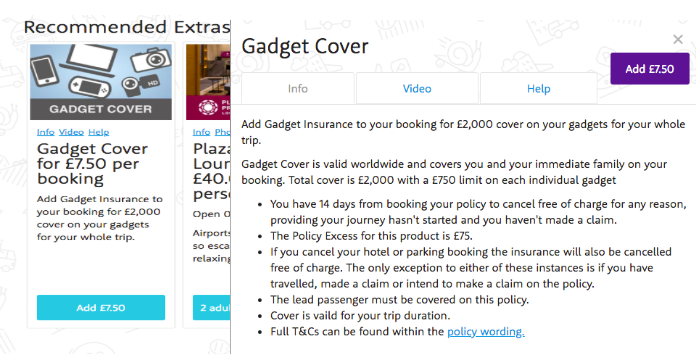
Please see the screenshots below to show how this looks on the website…
How do I find out the customer policy number?
Step One - Ask the customer for their booking reference from their hotel, parking, lounge or hotel & parking confirmation email.
This will be the 5 digit CHIPS reference i.e. YZ5U8
Step Two - You need to combine the agent code for the gadget add-on product with their CHIPS reference to generate their policy number, which is AX465.
Step Three - You need to add the first three letters of the lead passenger surname.
Example:
Agent code = AX465
Customer CHIPS ref = YZ5X9
Customer Surname = Test
Policy number = AX465/YZ5X9/TES
What does the certificate of insurance look like for the insurance add-on product and where can I find it?
The gadget add-on product will have been sold to the customer with a CORE product booking. The email confirmation will have a section about the Insurance cover in the main body of the email. This is the certificate of insurance for the customer and will also have a link to the policy wording.
Where can I search in Magenta for the policy?
**It will only be available the calendar month after the policy was purchased**